InfoBar was not working out as my phone became rather unstable.
Fortunately, I found Lightning Launcher which provides approximately the same look and feel as InfoBar.
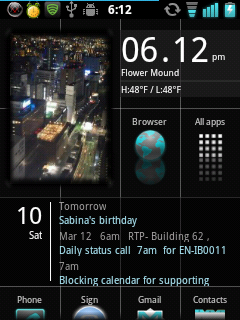
The big advantage of Lightning Launcher over InfoBar is that Lightning Launcher is a standard launcher app (easy to install) and supports widgets!
I only found this launcher by chance when I was looking to see if there would be a good launcher for my mom if I were to get her an Android phone and I first came across Big Launcher.

If I were to use the same approach in evaluating Lightning Launcher that I did for InfoBar:
 | One continuous (and infinite) home screen, so there’s no need to decide which app belongs on which screen. |
| Personalization options include being able to define number of columns for the apps. In theory, could even have a two-column launcher similar to Big Launcher, although I don’t know if the icons would also increase in size. The lines used to separate columns and rows are optional. I decided to use the lines to give it a look similar to InfoBar. The reflection special effect is also a nice touch (optional). |
| Layout of the app drawer is also customizable, so that you can either have a single column or grid format. I use a single column. |
| Grids can consist of different sized cells to add visual interest to the layout. Obviously very useful for widgets. |
| Grids may include photos which also add visual interest to the layout. FrameMe is a good widget which allows photos on the home screen sized at 1×1, 1×2, 2×1, and 2×2. |
| Performs well on my 600MHz phone (Sony Xperia x10 mini). |
| Since long press is configurable, I’ve set it up to display a menu for the app so that I don’t accidentally get into edit mode. |
 | It’s a pain to rearrange the layout as you can do it only one icon at a time. |
 | I’m only assuming, but since it performs well, I am assuming it doesn’t drain the battery. |
| Unless someone makes a widget for it, cannot use a photo in place of an icon like one can in some Metro-style launchers. You can use any image in place of an icon, though, but it has to be 36×36 and I assume would not take up the whole cell. |
| No dock bar. I don’t miss it, though. I may decide to install a side launcher. |
So in the end, approximately the same advantages and fewer disadvantages that trying to load InfoBar onto my phone.
See more progress on: keep a gadget journal

No comments:
Post a Comment