Sunday, March 25, 2012

Need to decide on an home entertainment system

CriteriaBoxeeXBMCGoogleTVClickerRoku 2 XS
Show Sources - Local / Network * - Local / Network *- Local / Network
- Amazon (& Prime?)
- HBO & Max
- Netflix
- YouTube
- Amazon (& Prime)
- Comcast
- Hulu Plus
- Netflix
- Web (Studio website)
- Local / Network (Fee) *
Live TVAdd On??--
Notes:
  • Boxee, XBMC, and Roku can support Netflix, etc, but through different Add Ons. I want to be able to find the show independent of knowing which provider has the show. In addition, they can support YouTube as well but not sure if as a source of TV shows and movies.
  • VUDU and iTunes are other sources, but I am not considering those.
  • The question marks for Live TV is to represent how simple it is to hook it up.

Having to look for shows and the thought about the ease of finding what I want to watch, such as Wilfred, I’d rather not have a set up where I have to look in multiple places (Hulu, Netflix, etc) only to find out it was free on the website.

Therefore, it’s down to Boxee, GoogleTV, and Clicker.

Clicker can actually run on GoogleTV, but that sort of defeats the purpose of having to only go to one place… but at least two places are better than having to go to x number of places.

With the flexibility of Android Market, GoogleTV would be a better option over Boxee. Thus, we are down to either GoogleTV (or possibly an Android tablet hooked up to the TV) and a PC running Clicker TV and XBMC.

Friday, March 16, 2012

Just because...

Ever wonder what it was like to be a jump rope?

No…?

But anyway, here is a video taken from the jump rope’s point of view.

Click the image for the video.

My next phone...?

While I’ve been looking around for what is to be my next phone, the logical phone after my Xperia x10 mini would be the Xperia mini. However, the biggest disadvan tage of the Xperia mini is that they did not put dual-facing cameras (front-facing and back-facing) on the phone. I’d have to get the Xperia mini pro with the built-in keyboard for the dual cameras.

However, anyway, Sony has now announced the Xperia U which not only has the dual-facing cameras but also has a dual-core processor.

PhoneSize (mm)Weight (g)Processor
Xperia x10 mini 83×50x16 88 600 Mhz
Xperia mini 88×52x16 99 1Ghz
Xperia U 112×54x12 110 1Ghz dual-core
Xperia Sola 116×59x9.9 107 1Ghz dual-core

Video is available here.

The disadvantage is that it is nearly one inch longer than I’d prefer it to be, but at least it is thinner AND has front-facing and back-facing cameras.

Update 1: Argh. Got two compliments on my phone (x10 mini) last week while in Raleigh. This is the worst thing that could happen because it would somehow encourage me to keep my current phone until I could find a better replacement.

Update 2: Instead of Xperia U, Xperia Sola looks pretty neat because it can detect your finger without you having to touch the screen. They call it “floating touch”. Also, I’m not a big fan of the new Xperia S style of design (colored bottom), so at least Xperia Sola has a different looking design.

Click on the above image for a video.

Sunday, March 11, 2012

Unfortunately

InfoBar was not working out as my phone became rather unstable.

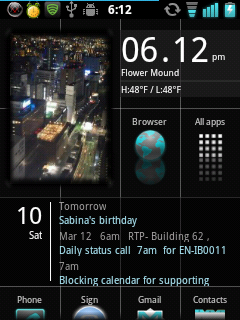
Fortunately, I found Lightning Launcher which provides approximately the same look and feel as InfoBar.

The big advantage of Lightning Launcher over InfoBar is that Lightning Launcher is a standard launcher app (easy to install) and supports widgets!

I only found this launcher by chance when I was looking to see if there would be a good launcher for my mom if I were to get her an Android phone and I first came across Big Launcher.

Big Launcher

If I were to use the same approach in evaluating Lightning Launcher that I did for InfoBar:

One continuous (and infinite) home screen, so there’s no need to decide which app belongs on which screen.
Personalization options include being able to define number of columns for the apps. In theory, could even have a two-column launcher similar to Big Launcher, although I don’t know if the icons would also increase in size. The lines used to separate columns and rows are optional. I decided to use the lines to give it a look similar to InfoBar. The reflection special effect is also a nice touch (optional).
Layout of the app drawer is also customizable, so that you can either have a single column or grid format. I use a single column.
Grids can consist of different sized cells to add visual interest to the layout. Obviously very useful for widgets.
Grids may include photos which also add visual interest to the layout. FrameMe is a good widget which allows photos on the home screen sized at 1×1, 1×2, 2×1, and 2×2.
Performs well on my 600MHz phone (Sony Xperia x10 mini).
Since long press is configurable, I’ve set it up to display a menu for the app so that I don’t accidentally get into edit mode.
It’s a pain to rearrange the layout as you can do it only one icon at a time.
I’m only assuming, but since it performs well, I am assuming it doesn’t drain the battery.
Unless someone makes a widget for it, cannot use a photo in place of an icon like one can in some Metro-style launchers. You can use any image in place of an icon, though, but it has to be 36×36 and I assume would not take up the whole cell.
No dock bar. I don’t miss it, though. I may decide to install a side launcher.

So in the end, approximately the same advantages and fewer disadvantages that trying to load InfoBar onto my phone.