Thursday, December 29, 2011

There's an app for that...

Just in case you need your fix of Hall and Oates, someone created an app. It turns out it started as a project by Michael Selvidge, new corporate communications manager at Twilio, to get familiar with developer tools, but it has gained in popularity. More people than he knew needed a Hall and Oates hotline.

They also made it available on a website in case you don’t want to call long distance. The hotline to hear one of your favorite Hall and Oates songs is 1-719-26-OATES.

Click the above image to go to the Hall and Oates hotline website: http://www.callinoates.com/

Note: The sound quality is not that great… OK, actually, it’s pretty poor, but you never know when you may need it in case of an emergency.

Wednesday, December 14, 2011

Easy way vs the hard way...

Self portrait… The hard way.

Throw your multi-thousand dollar camera in the air, spinning it, so that one of the shots will be of one pointing back to the ground. Click on the image for the video.

Easy way… Use an Android app like Morpho Self Camera

Click the above image to see a series of Android phone commercials with the Japanese music group Arashi. The above link starts with the commercial demonstrating the use of Morpho Self Camera. The female voice in Japanese is from the app telling them if “she” sees them in the camera lens or not, or how many people she sees. (Software supports recognizing only one or two people.) Note: The software uses your phone’s language setting so that it will speak English if your phone is set up in English instead. Morpho Self Camera can be found in the Android Market at this link.

Of course, the other way to do it is just to take the picture blindly as we all normally do, but using face recognition software is much more fun! Well, OK, much more fun until you get tired of the phone telling you that she doesn’t see you.

In a similar vain to the hard way, here is a painful video on how to lose $2,400 in 24 seconds:

Click on the above image for the 24 second video. Note, “painful” is more figurative at the thought of losing $2,400. There is a happy ending though as you can see in the comments.

Wednesday, November 30, 2011

"Oh, this is me. Nice!"

He can’t dry the dishes, but here’s a cute robot called Qbo who due to his programming to recognize objects, was able to learn to recognize himself:

Click on the image for the video.

Additional references:

Friday, November 25, 2011

Tuesday, November 8, 2011

Unlimited phone calling/data/message plan for $19/month???

A mobile phone with unlimited data for only $19/month with no contract!!?!?! It's Republic Wireless.


How does it work?

When you're within a wireless network, you'll use wifi instead of your mobile connection for data, voice, and messaging. They'll keep track of whether you're staying within their planned ratio of wifi vs mobile. If you use too much, they'll provide you with some warnings, and if you're not able to get below a certain threshold, then you will be moved to a different plan/provider.

Monday, October 24, 2011

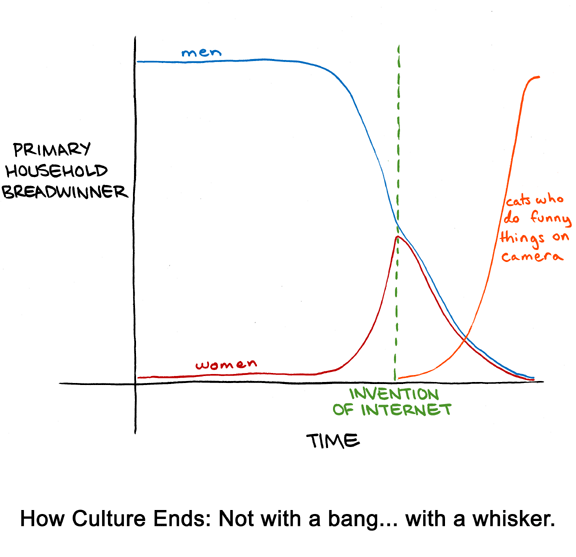
What to do when your cat earns more than you...

This diagram (albeit lacking citations for the empirical data) shows how salaries of women over time have earned generally increased to the point of almost becoming equal to salaries of men, but then with the advent of the Internet and the popularity of LOLCats, cats have now become the primary income earner in many households.

And as the person who created the diagram concluded, this is the mark of the end of humanity as we know it.

Source:
http://www.smbc-comics.com/index.php?db=comics&id=2407

Monday, October 17, 2011

iPhone 4S vs Samsung Galaxy S II drop test

Not that I would consider myself clumsy, but having rather durable gadgets is a plus in protecting my investment… This becomes a necessity considering my wife may not allow me to buy another gadget just because my current one broke. (I know... Cruel...)

SquareTrade did a drop test comparing the iPhone 4S with Samsung Galaxy S II.

Click on the link for the video.

Wednesday, September 28, 2011

Real competition for the iPad

Amazon has announced their new color e-reader called Kindle Fire. Kindle Fire is a 7” tablet which runs on Android. However, Amazon has customized the interface so that you cannot tell it is Android. Most likely, this customization includes that you will not be able to get to any Android function which Amazon does not want you to get to without rooting your device.

Click on the above image for a video tour.
Defining the Kindle Fire is a little tricky. While it is based on Android, it is not a full-blown tablet. There is no camera, microphone, or other peripherals you would expect with a tablet.
However, you can:
  • Run any Android app which you get from Amazon’s Appstore which not only include the apps which are always free but also the paid apps which are featured as Free App of the Day. (Today’s free app is the extremely popular game Cut the Rope.)
  • Browse the Internet. They have their own web browser which utilizes Amazon servers to speed up viewing webpages on your device.
  • Browse content, which not only includes books, but streaming of music, movies and TV shows from Amazon.
But why is this competition for the iPad? Amazon is selling the device at an extraordinary price of $199, half that of the iPad.
Amazon has also announced an e-ink Kindle for $79 and the Kindle Touch for $99 (or 3G Kindle Touch for $149).
More details are available on Amazon’s website at this
link
.
Based on Apple’s past practices, they’ll be suing Amazon as an attempt to eliminate competition.
Update: “Real competition for the iPad” does not mean that the Kindle Fire can do all things which the iPad can do. Keep in mind that the Kindle Fire is about half the price. What I meant though is that the Kindle Fire can introduce people to using tablets and cut into iPad sales. In order to keep costs down, the Kindle Fire is missing some components found on normal tablets, such as a microphone and camera. People who bought the Kindle Fire also complain about the software is “laggy” (slow) at times. It all depends on how you plan to use the device. Also, keep in mind that the Kindle Fire is not using e-ink technology but has a normal LCD. This means that the screen is not easy to view in direct sunlight unlike e-ink e-readers. For about $100 more, one can find a tablet which has more functionality of a full-blown tablet, although the price of higher end tablets can be much more.

Tuesday, September 27, 2011

As part of getting organized, I need to find tools which will help me get the job done.

Open letter to Google:

While I’m a big Google fan, unfortunately, Google apps fall short in many areas. Without better integration of the Google apps, Google will end up falling behind the likes of Facebook, iPhone, and potentially even Microsoft.
Overall
Google has some exceptional apps, like Gmail, YouTube, Maps, Picasa and others. On their own, most Google apps including Calendar, Reader, and others can stand on their own. However, from an integration point of view, Google generally falls flat. While there have been across the board changes to the apps, simply making the user interface more consistent is way short of the needed integration.
Below, I’ll get into details how specific Google apps can improve:
Google+
Google’s answer to Facebook. It started out with a great start, but statistics showed that the number of public postings decreased during beta. While taking Google+ out of private beta has brought on a huge number of people signing up, Google shouldn’t pause to congratulate itself because otherwise it will find similar to private beta, the general public will find Google+ less appealing to continue to use.
Some of the changes which Google needs to make to Google+ are:
  • The most important change is to allow pseudonyms. If you really want people to grow their social network on the Internet, you have to give them to safety of a pseudonym. It’s a safety risk to expose so much traceable personal information on the Internet. At a minimum, it may be ok for the Google account to be tied to a real name, but it should not be required to expose one’s real name as part of Google+.
  • The second most important change is to remove the requirement that a Google account is tied to an individual. Sometimes it makes sense to have family accounts to make it easy to also post information at a family level separate from an individual level.
  • Google never has seemed to be good at developing an attractive user interface. While there’s something to be said about a simple interface, there’s also something to be said about aesthetically pleasing eye candy. If someone can have a beautifully architected plain house or a aesthetically pleasing, beautifully designed house, I think most people would pick the latter. This also applies to Android apps. Who wants to see 6 simple icons on a screen for a menu?
Update: My original post was from Sept 27, soon after the Google+ public launch. Google+ experienced peaked traffic, but it soon went down to pre-public launch levels as shown by [Chitika] in their post from October 7.

Can I call it or what? (OK, didn’t take a rocket scientist.)
Google has pointed out 3.4B pictures uploaded to Google+ in their first 100 days. That’s A LOT of photos. Hopefully they aren’t drinking their own kool-aid though. One of the functions of the Google+ Android app is to automatically upload photos taken from your Android device. I’ve had hundreds uploaded, but none shared on Google+.
Since then, Google has announced they will start allowing anonymous accounts. It’s a beginning, but they still have a ways to go to make Google+ the place to go for social networking.
Gmail
Gmail is generally known as the best mail service on the Internet. Lots of good capabilities exist, but if Google sits on its hands, Gmail will be passed.
Some of the improvements should include:
  • Gmail should be one’s inbox for everything, not just mail. As an example, in addition to mail, it could post all updates from Facebook, Twitter, even 43T. Everything would be chronologically ordered like mail, but could filtered out whether user is only interested in mail or any one of the other sources. To me, it makes no sense to subscribe to updates, so that they can in turn send a mail to your Inbox which results in cluttering up one’s real Inbox. Why not just show the notifications as part of the Inbox without having to have actual mails be sent to you.
  • If my inbox can now be filled with many more notifications from a wider range of sources, I need a better interface to be able to get through all of it. I can whiz through 100s of new articles using Google Reader. I would love a similar type of interface which would allow me to go through the entire inbox just as quickly.
  • For people who have multiple Google accounts, there needs to be a way to share contact information. It makes no sense to maintain multiple duplicate copies of contact information. I know there is an export/import capability, but it should be automatic. In fact, while sharing contacts, it should also be possible to specify which contacts to share. As an example, for example, one would not necessarily want to share all of one’s individual contacts with contacts associated to a family account.
Android
I can’t believe I’m putting Android here. Andy Rubin, “father” of Android, is a brilliant guy… but sometimes, it looks like he doesn’t get it.
He criticized iPhone 4S personal assistant function Siri saying that people should use their phone to communicate to other people, not to their phone. He seems to be ignoring the fact that our phone is not just a phone anymore. It’s the reason personal digital assistants (PDA) are basically obsolete. People are now using their phones also as their PDAs… So of course, then an assistant is a perfectly logical use of their phone.
And hopefully Google realizes that their strategy for continued dominance of the phone market is to make Android ubiquitous as I mentioned in January. The new GoogleTV will have Android support. Archos is making landline phone systems and alarm clock type devices running on Android. It’s a start.
More to come including:
  • Google Calendar
  • Google Tasks
  • Picasa
  • Blogger
  • Google Sites
  • Google Docs
  • Google Health
  • Maps
  • Google Bookmarks
  • Google TV

Monday, September 26, 2011

Who needs a watch when you can have this waterfall?

The “water clock” at Osaka station.

Click on the above image for the video.

Monday, September 12, 2011

Way cool! Mouse without borders!

Have you ever wanted to drag and drop files across two computers?  Copy and paste text across computers?  Now you  can with the Microsoft Garage project "Mouse Without Borders".

More details are here: http://blogs.technet.com/b/next/archive/2011/09/09/microsoft-garage-download-mouse-without-borders.aspx

Or you can download the software directly from here: http://aka.ms/MouseWithOutBorders

Or you can first view the YouTube video:


Even my wife would like this... Now only if we had more computers... Hmmmm... "Hey honey, I have this cool thing to show you... but first, I have to buy more computers..." Yeah, that'd work!

Sunday, September 11, 2011

Gingerbread!

Woo hoo! Gingerbread is finally available for my wife's Xperia X10.  I just have to be careful when upgrading or she'll kill me. You know, in the way that she does.


The main thing is that I have to make sure her playlists will be preserved. Speaking of preserving, my version of Titanium Backup has been freezing up frequently. I may have to go back-level. I think my wife's phone has a back-level version.

Now if only they would provide a Gingerbread version for my lowly X10 mini. I guess that means I'll need to upgrade my phone soon. (Wry smile...)

Speaking of Android, there is a nice looking 5" Latte ICE SMART Media Player running Android 2. It's on Android 2.3, has a 800MHz processor, 800x400 dual point RESISTIVE touch screen, 256MB RAM, 8GB internal storage, up to 32GB microSD card storage, WiFi, mini HDMI output, and Android Market pre-installed. Very tempting at $160-$170 at J&R or Amazon. Per a comment on Amazon, it only has 2 directional G-sensor, so any games which may depend on more sophisticated sensors would not work on this device. Also, a camera is one of the items missing from its specification.

The 256MB limitation is very restricting but I've found Link2SD works flawlessly on my X10 mini running Android 2.1.

Strategy

OK, I need to outlay my strategy. Not the strategy for convincing my wife to let me buy all the things I need, er, want, er, need... but what it is I need to buy anyway.

The ideal system is one which is integrated. However, if everything can be run off of Android, perhaps they do not need to be so integrated.

Security system
  • Remote allows arming/disarming
  • Allows identification of zone where the sensors indicate an intrusion
  • Security cameras 
  • All above functionality can be done within the house or remote
  • Door locks based on either biometric or other remote mechanism
Speaking of which, security cameras to cover:
  • All key spots within the house
  • Perimeter of the house
  • Out to the street including night vision
  • Motion sensors to trigger automatic video recording
  • Video archiving
Home automation
  • Related to home security, motion sensors at key points inside house and perimeter with logging of activity
  • Lights activated and deactivated upon timer and motion
  • Home automation to also include temperature control
  • Controlled by remote either within house or remote
Since I have Lightolier Compose PLC light switches in the house, I am running on an x10 system. From my perspective, they are the most stylish of the light switches, I am stuck with x10 for the moment. Thus, the software I'd need to use would need to be compatible with x10.

Of course, I'll need to also find light bulbs which are compatible with x10 systems, too. In the meantime, I am dependent on incandescent light bulbs where I have light switches hooked up.

We currently have ADT for home security. They have a package called ADT Pulse which includes home automation, but I'm not sure I want to spend the extra money on Pulse. However, seems the cost of Pulse is only incremental compared to what we are already paying for monitoring services. With home automation capabilities, approximately $50/month and for video, an additional $8/month. Unfortunately, their video support does not include IP cameras. Pulse also works with Z-Wave, not x10.

Home entertainment
Obviously this would cover:
  • Movies/TV
  • Music
  • Home video and pictures
Movies/TV should include on demand for any show, a queue mechanism to identify which shows we want to see, and a trailer capability to help decide which movies we want to see.

Our current set up mainly includes the long defunct ReplayTV. Even at over 10 years old, they are still going strong. Yes, we have 4 ReplayTV units in our house. Actually, we had 6 at one point, but I have given one to my mom. The disadvantage of ReplayTV is that it does not record high-definition. However, the recording quality, even for standard, is pretty good. The big advantage of ReplayTV is that it is possible to share with other ReplayTV owners. The other big advantage is that it is easy to download, archive, and take recorded shows with me on trips. For our provider, we currently have Verizon FIOS TV which is way too expensive. 

Anyway, to integrate our home entertainment, XBMC is a good candidate with its ability to present our recorded shows in an easy to use format as well as supporting various streaming providers.  I would still like to integrate the ReplayTVs somehow. Someone had created an XBMC plug-in but unfortunately, it doesn't appear to work.

The big wildcard is Google TV. With their upcoming follow-on release, it may provide the desired capability missing from its original offering. Especially if we use Google Music for cloud-based music and Picasa for our home videos and photos, Google TV may provide a better integration than XBMC.  This also does not mean that XBMC and Google TV are mutually exclusive though.

Home phone
Currently we are using Verizon for phone services, but it seems we should be able to find a cheaper alternative. At any rate, we are using Skype to call Japan and Google Voice is also a good alternative for free calls within the US.

The phone system itself has to go. It is an old Siemens Gigaset where people say the voice comes across too softly. A phone system which supports integration with a common contact list with our PC and our mobile phones makes the most sense. Since we have Android phones, then an Android-based home phone system makes sense, too. I always liked the idea of being on the phone and easily able to check weather or traffic.

Anyway, shouldn't our phone system be able to support video conferencing, too? Thus, what are the best options? Perhaps this is where Google TV may come into play, too.


And regarding the criteria for a solution, obviously eye candy is an important criteria.

I guess one of the reasons why I consider Apple as evil is due to the similarities of their policies with the right...

  • There was the infamous incident where an Apple employee lost an iPhone 4 prototype in a bar. It was recovered (for $$) by the blogging tech website Gizmodo. They contacted Apple and simply wanted confirmation that they had in their possession the new iPhone, but Apple would not do that. Eventually the phone was returned to Apple and everyone already knew who the person was who found the phone (turned in by a spiteful roommate), but in something I would only expect in a world like that in the book “1984”, the police broke down the door of the Gizmodo tech writer to confiscate his computers. There was lots of speculation in various tech forums that the Gizmodo tech writer would face charges, in a sense, justifying the action by the police, but in the end, no, the tech writer was never charged with anything.
  • Well, you may have heard in the news recently, once again, an Apple employee lost the newest iPhone prototype in a bar. At least it was a different Apple employee this time. Anyway, Apple used the phone’s GPS to track down the location of the phone. This time, police went to the door and without a warrant started to search the occupant’s house. This was originally reported by the tech website CNET, but when other news media tried to confirm with the SFPD of this incident, SFPD denied any knowledge of such a raid. This led people to assume CNET had done shoddy reporting and only wrote such a baseless article because of ill feelings toward Apple. However, later SFPD changed their tune and said that they did accompany Apple employees on such a visit. During the visit however, they all flashed badges and noone identified themselves as Apple employees. In fact, besides looking for the phone, they also questioned (aka, threatened) the immigration status of him and his family. (Just FYI, they are all legal.) And no, they have not yet found the phone.
  • We all know that Apple dictates what software is allowed to be put on the iPhone. They reject apps which they consider “smutty”, so now they are being the judge of what is considered decent and what people are allowed to view on their phones. Interesting enough that they rejected all such apps except for that of Playboy. I’m sure this exception was made because we all know we only read Playboy for its articles. They also decide which companies software can run on the phone as they have made all efforts to prevent Adobe from having their Flash player available on the iPhone and iPad.
  • Apple has been known to silence (ie, delete) critics on their forums.
  • During these hard economic times, they gave the new CEO Tim Cook almost $400 million in stock as a bonus for becoming CEO as if his CEO salary and position of being CEO of the company with the highest market value in the world is not enough.
  • Instead of competing based on their products, they are suing competitors. Most notably, Samsung has arguably the best Android tablet on the market, and Apple has been trying to sue them to prevent them from being able to sell their new tablet. Where they first filed for blocking the sale of Samsung tablet in Europe was a conservative German district, who initially agreed to impose an injunction to block the sale of the Samsung tablet in all of Europe until later it had to backtrack when it came to realization they had no authority to speak for Europe. In the meantime, the case was then brought forward to a court in the Netherlands where out of the 10 patent claims, the judge ruled 9 out of the 10 claims invalid and only supported that there was a potential patent infringement based on Apple’s patent on touch scrolling for photos which did not apply to Samsung’s tablets, only a handful of phones not yet running on the latest Android level. In addition, it was discovered that the documents which Apple submitted in Germany had doctored photos to make the Samsung tablet look more like the iPad. In recent news, the judge in Germany has agreed to Apple’s claims and decided that the Samsung tablet “looks” too much like the Apple iPad, saying there are alternatives to designing a tablet other than a “minimalist” look. Does Apple have a patent on minimalist look? No. So the judge’s decision is then not even based on any patents.
  • At any rate, with the below diagram, we can see that “suing” is the way companies are trying to block other companies. We see that Apple is highly involved in this approach. If there’s a bright side, it’s the tens of millions of dollars being spent to pay lawyers for these lawsuits, which in the end means their fees are being paid by consumers.

    Diagram courtesy Gizmodo under the article US Patent System Is Killing Innovation.
  • The most recent lawsuit filed by Apple is that they are suing a Chinese food company for their logo.

    Somehow Apple says their logo is improperly similar to Apple’s logo. These lawsuits are not only a financial burden on Apple and that of the targeted company, but also on our legal system. This is similar to the time Apple sued Woolworth over their logo:

Some of the points were already outlined in an earlier post.

References:

Wednesday, August 31, 2011

Is that the Human Torch? The Silver Surfer?

No, it’s a surf board with flares…How gnarley, man!

Click on the image for the video. (And more proof that some people just have way too much time on their hands… But we wouldn’t have cool things if people were always busy…!)

Thursday, August 18, 2011

ViewSonic gTablet... Meh

I bought the ViewSonic gTablet for my mom for a Mother's Day present earlier this year.  At $299, it seemed to be a good deal. At first, she liked it, but then inexplicable force closes occurred. She said she didn't want it anymore, but later in the year, when I visited her, I was able to reinstall the apps and it's generally working again.

I bought it for her so she could have an easy way to surf the Internet, check her e-mail, etc, such as doing it from the sofa while watching TV.

It was probably a good purchase at the time, but now, if I had to do it all over again, I would opt for a different tablet. Below are the pros and cons of the tablet based on the standard software.

 Pretty good screen when viewing from front
 Price
 USB host - although I have not tried it yet
 I actually like the Tap UI for my mom
 1.0 GHz Tegra 2 dual core processor, but dual core is not enabled
 Not difficult to root to load Android Market
 1.8 pounds is actually rather heavy for a tablet
 Poor viewing angles
 High quality YouTube videos stutter (not always though)
 Bluetooth HID profile not supported
 Android 2.2
 Tap UI dock bar has only support for fixed number of apps
 Dashboard does not support widgets
 Dashboard photo app does not support access to private Picasa Web albums
 Loading additional soft keyboards require root access

I'm going to be generous and give it a 3* (out of 5). However, even at $250, I would not recommend this tablet. Half of the negative points I list above could be addressed through a software upgrade. Thus, it seems to really take advantage of this tablet, you'd need to load a custom ROM.

Tuesday, August 2, 2011

New digital camera??


Wow! My wife has agreed it's time to replace our broken digital camera!

Here's a list of criteria for my digital camera:
  • GPS & compass
  • Wifi
  • 5+ megapixel
  • 5x+ optical zoom (only 4x on the DSC-TX100V)
  • 3D (sort of?)
  • HD video recording, 30 fps
  • Super slow-motion
  • 3D video
  • 3D screen (sort of?)
  • Image stabilization
  • Face detection
  • Lightweight and thin
  • Affordable price
Unfortunately, they don't make such a camera yet. However, the Sony DSC-TX100V comes close. It has the above items in bold.

However, since my wife used to have a Canon EOS, I know she's interested in photography. Therefore, she might be tempted by a Micro 4/3's. But I am still interested in the above items, including 3D and video quality. She says she's not interested in those things, only pictures!  What???? Obviously to be continued...

For my mom, I am getting the Casio Tryx. Not that my mom is necessarily interested in cameras, but she is interested in golf. The Casio Tryx supports slow motion or, errr, high speed 240fps at 430 x 320 resolution. Also, with its unique design, it's easy to have the screen facing you will you tape your golf swing. Some drawbacks, too. In summary:

Casio Tryx


 Slow motion, err, high speed 240fps at 430 x 320 resolution
 LCD can be directed to golfer or person taking video
 Unique design is in itself its own tripod
 Does not support standard tripod mount
 No flash (LED light instead)

Will document my impressions after we get a chance to try out the camera.


Sunday, July 24, 2011

My wife scoffs at me

and questions why she can remember birthdays better than I can.  The answer is simple.

And when I come up with it, I will let you know.

And this would be a perfect use of Google+... Within Gmail contacts, you can specify dates like birthdays, anniversaries, and so forth. Then Google only needs to provide the capability to mark which dates within your contact for which you'd like to receive a notification and potentially how far in advance you'd like to receive it. In addition, if the contact is within a circle, the marked date would also appear in the stream for that circle.


Actually, another option is if you can tie dates in contacts to your events in your Google calendar. Then the calendar entry can be marked whether it provides you notification or not. Besides improving the social aspect of sharing, Google should focus on making information easier to manage. Duplicating the same information in multiple Google Apps is not desirable.

Friday, July 1, 2011

This year has been an up an down year...

If up means weight, then mainly up. It seems that while I’m traveling, I’ve managed to gain weight. I’m not as into regular exercising as I was last year and I am probably eating too much at the breakfast buffets at the hotel. I’m haven’t quite figured out the correlation between eating too much at the breakfast buffets and gaining weight, but I’ll probably figure it out.

At any rate, based on the previous post that sitting is probably one of the worst things you can do all day from a health perspective, I have been using the counter as my new home office desk so that I stand while working. And it is a lot of work!

Unfortunately I haven’t had any time to exercise ever since coming back from my previous business trip, and I don’t know if it is just my body trying to get back to its earlier weight, but so far, I’m getting much closer to weight I was earlier this year.

I now have a strong admiration for people who have to be on their feet for their jobs.

Monday, May 30, 2011

Can you imagine, from your home phone, being able to:

  • Share your contact information with your home phone and mobile phone?
  • Videoconference?
  • View who is at the front door through your IP camera?
  • Check weather, directions, and traffic? Or just sports scores, other news stories?
  • Control your home automation?
  • Have your TV flash who is calling? As well as incoming SMS messages? E-mail notifications?
The answer is clearly Android… just waiting for manufacturers to come up with a landline Android solution.
Some manufacturers have like iDect by Binatone but need to wait until there are phones which can support the latest

Like my other goals, will be consolidating this goal with Create a way to evaluate and compare different things

Thursday, May 26, 2011

Ugh... So much for my dream office with a zero gravity chair...


I know there are benefits to a “standing desk” where you work while standing up. I’ve been thinking of setting up something at home.

Now this article says that sitting is so bad, it can even offset the exercise you do. Since I’m in the hi-tech industry, I am sitting most of the day.

I need to change this… Somehow.

Reference:
http://opinionator.blogs.nytimes.com/2010/02/23/stand-up-while-you-read-this/?em

And unlike the photo above, I would never, ever, ever use my zero gravity chair to sleep while working… And when I do, it would only be because my eyelids are too heavy.

Saturday, March 5, 2011

Next purchases... Tablet computer

Don't tell my wife, but we will be getting new tablets this year. However, since I know that I won't be able to buy a new one every time a new tablet is announced, I'd better keep my eye on the ideal tablet:
  • Touchless gestures
  • Motion detector (although can be done through camera)
  • Can be used as second monitor (seems like iDisplay can do this)
  • Contactless battery charging
  • Glasses-free 3D screen
  • 3D front-facing camera
  • 3D back-facing camera
  • 3D video
  • HDMI out
  • GPS (although potentially can used phone's GPS through Bluetooth)
  • Weight around 1 lb
  • Stylus input (with palm rejection) on capacitive screen
  • USB slave/host capabilities
The following are considerations when comparing models:
  • Processor
  • Screen resolution
  • Camera resolution
  • Weight
  • Thickness
  • Multitouch
  • Bluetooth
  • Microphone
  • Price
  • RAM
  • Internal Storage
  • External Storage
  • Battery
I know prices will go down later in the year. The question is will I be able to wait.

Tuesday, February 22, 2011

Trick question

How many TVs do two people need?

Sony has demoed a new TV which allows two people to see two different pictures depending on their viewing angle. One of the obvious uses is in video games with two people competing against each other. They can be sitting side-by-side but still only see things from their point of view.


Jaguar utilizes a similar concept in their Dual-View Touch-Screen so that the person sitting on the passenger side can watch TV while the driver is viewing menus for the car controls or the navigation screen.

http://www.jaguarxjmedia.com/ENG_ENG_dualscreen.html#/dual-screen

(Unfortunately, Jaguar does not allow direct access to the link above, so you have to first select your preferred language, then click on Dual-View Touch-Screen when the interior of the car is shown.)

With the Sony TV, this means a couple no longer has to fight for the remote control. In theory, they would be able to sit side-by-side and each watch what they want. (Of course, this would not be practical until dual audio is perfected...)

Reference: http://www.pocket-lint.com/news/38703/sony-killzone-3d-spilt-screen-dual-view

Now back to my original question, how many TVs do two people need?  One? Not yet. Two? Don't make me laugh. At a minimum, you have to consider a TV in the guest room. Three?  Not even close. Remember, there's also a media room. Four?  Getting warmer.  Five is the right answer.

Not bad for a household with an analog wife.  When we bought our latest TV, she at first told me it would be the last TV for the next 10 years. *Gasp* Who makes up these rules?  And later, she told me it would be our last TV ever... I think she makes up these rules as we go along... But actually it helped me focus my attention on the objective on hand. Since the TV we were buying was for our family room, my original goal was to get the largest TV possible which could fit in the entertainment nook. I was even leaning toward a projection TV from a cost point of view. However, when she told me it would be the last TV for the next 10 years/forever, I realized I needed to think outside the box... or at least outside the entertainment nook. With an articulating arm from Draper, we were able to get a plasma TV much bigger than the entertainment nook.


I guess having an analog wife is not so bad after all. But I still think the TV is too small.

Monday, February 21, 2011

NEC has announced a new phone which is 7.7mm thick.

Unlike other phones which tell you how thick they are at the thinnest point, this phone is 7.7mm thick the entire length of the phone.

How thick is 7.7mm to us normal people?


(OK, just kidding about the "normal" bit.)  It's approximately 0.3 inches. Or you can lay 3 of these on top of each other, and it'd still be less than one inch. In comparison, my Sony Ericsson x10 mini is about twice as thick. Unfortunately, there are no plans to bring this phone to the US.

Typical conversation with my analog wife:

Me:NEC has announced a phone which is 7.7mm thick.
Her:But it won't work over here (in the US), right?
Me:Are you implying that there's supposed to be some sort of relationship between it working in the US and me buying it...?

Unfortunately, she has a point. I hate when that happens.

Reference: http://www.nttdocomo.co.jp/2011_newmodel/index.html

There's something sexy about pinch to zoom

I'm not a big Apple fan. However, one thing I will gladly admit is that they did raise the bar to improve the quality of devices and how we can interact with them.

My wife has a Sony Ericsson Xperia x10. Finally, they released the update which allows multi-touch. Actually, it's not true multi-touch but it does recognize when more than one finger is on the touch screen at a time. That's pretty close.


So now, my wife can now do pinch-to-zoom. She's happy. And when she's happy, I'm happy.

By the way, not that she's actually used pinch-to-zoom yet... But it seems she's happy just knowing she can use it. And unfortunately, the hardware on my Sony Ericsson x10 mini cannot support multi-touch, not even fake multi-touch. Forget what I said about when she's happy, I'm happy. When she's happy, I'm jealous!