Saturday, February 20, 2010

Friday, February 19, 2010
Details: Home entertainment strategies
As a gadget-loving guy, I'd love to have an integrated home entertainment system. Something which allows me access to my local content as well as any entertainment out there on the Internet plus subscription services.
Currently, our home entertainment system consists of 6 ReplayTVs. While ReplayTV is no longer and TiVO is the more well-known brand name, ReplayTV was one of the pioneers of the digital video recording devices.
Since programs were recorded onto a hard drive that means you could not easily take a program you recorded on one ReplayTV to watch it on another ReplayTV unit in another room, so they were one of the first to allow viewing from another ReplayTV device using your home network. Cool!
ReplayTV also pioneered being able to share across ReplayTV units which were not within your home network. They included some limitations to this capability such as limiting the number of times you could send a program to outside your home network and preventing received shows from another unit from being sent outside of your home network.
ReplayTVs also did things like auto commercial advance. While not perfect 100% of the time, it's quite accurate and automatically skips commercials. With nearly unlimited funds, networks and studios filed suits against ReplayTV. Eventually in newer models, this function was disabled. I'm sure fighting all these legal battles were a strain to their funds. This is one reason for my distaste against studios, MPAA, RIAA, etc. They want to tell us that we have to watch commercials? PUH-LEEEEAZE.
One nice thing about ReplayTVs is that some people have found ways to improve upon the ReplayTV units. One is the ability to substitute your own hard drive. This allows people to put in much larger hard drives than what were in their units originally. Basically all of our units have 400GB hard drives which translates to about 400 hours of recording at standard quality. The capacity of each ReplayTV unit is then about the equivalent of 67 VHS videotapes (6 hours per tape) or 200 DVDs (2 hours per DVD). Another reason why the ease of replacing the hard drive is important is because out of the last approximate 10 years of use of ReplayTV units, we have not had a failure in the ReplayTV units themselves except with the hard drive... So all of our ReplayTV units are still working well.
Another improvement available for ReplayTV is freeware which interacts with ReplayTV units. One is to make your PC look like a ReplayTV unit within your home network. This makes it easy to manage all of your recorded TV shows. I have literally thousands of hours of programming to watch. Unfortunately, most of them are unwatched, but I plan to watch them some day. However, since ReplayTV is no more, there is not a lot of activity these programs which work with ReplayTV anymore. There is still a group of dedicated ReplayTV owners, but with no new development, such as support for recording HDTV, people of ReplayTV are gradually moving onto more modern devices.
This leads me back to what our current set up is and some people may be wondering, even for a gadget-loving guy, aren't 6 ReplayTVs for two people a little extreme? My initial reaction to such a question would be "Hell no", but there is also a logical explanation. The original plan was to only buy four ReplayTV units. Two for us, and two for my mom. For my mom, one was to be for her house in Illinois and one for her condo in Florida.
Two of the units I bought were 320GB ReplayTV 4000 units. However, when they introduced the ReplayTV 5000 units, the ReplayTV 5000 units were not compatible for video sharing in your home network with ReplayTV 4000 units. The company offered a free upgrade to the ReplayTV 5000 units. Super!
In addition, they did not offer a 320GB ReplayTV 5000 unit... So for customers who had bought a 320GB ReplayTV 4000 unit, they offered TWO 160GB ReplayTV 5000 units! Super super!
So that is how we have 6. And since my mom no longer has house in Illinois, my mom theoretically only needs one in Florida. At the moment though, she does have two as she has been having some problems with the ReplayTV unit on occasion so the other one is acting as her backup.
ReplayTVs are something which my wife has been able to enjoy using. Recording shows is very easy with the program guide and finding recorded shows is also very easy. ReplayTV lets you pause live TV at any point (such as when there is a phone call) and lets you watch recorded shows while it is recording a new show. Despite how much she enjoys using the ReplayTV units we have at home, she is against me trying to get a unit to her parents in Japan. I'll have to continue to work on that.
Our current TV provider is Verizon FIOS to whom we pay way too much money. I'd definitely prefer switching over to some streaming service like Hulu Plus, Netflix, etc. One of the big inhibitors to switching over to Netflix is their lack of support for closed caption/subtitles. Since English is not the native language for my wife, it helps to be able to have closed caption or subtitles. Netflix has finally recently announced support but I am not sure yet if support covers all of their streaming titles or a subset. In addition, it is unclear how much of their inventory they support through streaming.
Some other remaining elements of our home entertainment system are the digital TV (DTV) converter boxes and a Sling Media SlingPlayer. SlingPlayer is a box which sends video transmissions over the Internet, so that you can watch TV from anywhere you have an Internet connection. The limitation is that it only allows one simultaneous viewer per SlingPlayer and that whatever is being transmitted has to be what is being shown locally. That is, if I am on a business trip, and the SlingPlayer is hooked up to our family room TV, then if my wife is watching a TV show, then I have to also watch the same show or face her wrath by changing the channel on her. Anyway, our Sling Player is not hooked up to our family room TV, and actually, I have not been using the SlingPlayer so much, so we haven't run into that conflict... yet.
One of my major objectives, besides having a seamless approach to a home entertainment system, is to have an easy way to view the archive of recorded TV shows.
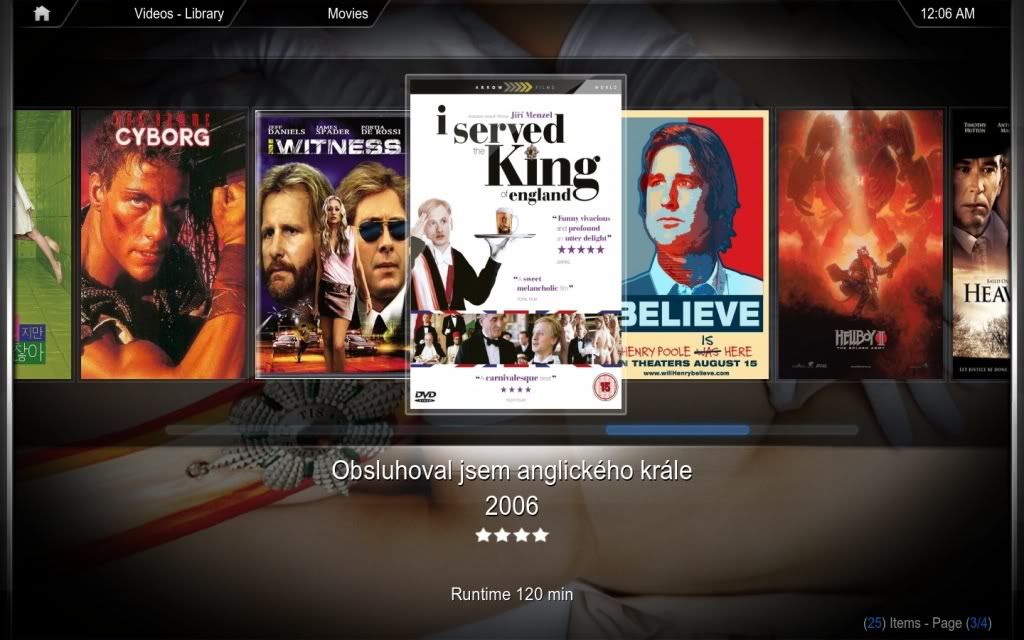
To me, having the proper "eye candy" is important. This is where something like Boxee, XBMC, and MediaPortal, could come into play. I'm still struggling with the solution though. Recently, Plex has announced a media server which works on Windows. The advantage of a separate media server is then it is not tied to the client, providing more flexibility in choosing the client. Of course, the client will have to be compatible with the media server.
Part of the problem of having an analog wife is that I have to figure out what the strategy is before buying the components. It's not as if I can play around with something and then later decide to go in a completely different direction. So it looks like I'm no closer to this solution than I was several years ago. Sigh.
Currently, our home entertainment system consists of 6 ReplayTVs. While ReplayTV is no longer and TiVO is the more well-known brand name, ReplayTV was one of the pioneers of the digital video recording devices.
Since programs were recorded onto a hard drive that means you could not easily take a program you recorded on one ReplayTV to watch it on another ReplayTV unit in another room, so they were one of the first to allow viewing from another ReplayTV device using your home network. Cool!
ReplayTV also pioneered being able to share across ReplayTV units which were not within your home network. They included some limitations to this capability such as limiting the number of times you could send a program to outside your home network and preventing received shows from another unit from being sent outside of your home network.
ReplayTVs also did things like auto commercial advance. While not perfect 100% of the time, it's quite accurate and automatically skips commercials. With nearly unlimited funds, networks and studios filed suits against ReplayTV. Eventually in newer models, this function was disabled. I'm sure fighting all these legal battles were a strain to their funds. This is one reason for my distaste against studios, MPAA, RIAA, etc. They want to tell us that we have to watch commercials? PUH-LEEEEAZE.
One nice thing about ReplayTVs is that some people have found ways to improve upon the ReplayTV units. One is the ability to substitute your own hard drive. This allows people to put in much larger hard drives than what were in their units originally. Basically all of our units have 400GB hard drives which translates to about 400 hours of recording at standard quality. The capacity of each ReplayTV unit is then about the equivalent of 67 VHS videotapes (6 hours per tape) or 200 DVDs (2 hours per DVD). Another reason why the ease of replacing the hard drive is important is because out of the last approximate 10 years of use of ReplayTV units, we have not had a failure in the ReplayTV units themselves except with the hard drive... So all of our ReplayTV units are still working well.
Another improvement available for ReplayTV is freeware which interacts with ReplayTV units. One is to make your PC look like a ReplayTV unit within your home network. This makes it easy to manage all of your recorded TV shows. I have literally thousands of hours of programming to watch. Unfortunately, most of them are unwatched, but I plan to watch them some day. However, since ReplayTV is no more, there is not a lot of activity these programs which work with ReplayTV anymore. There is still a group of dedicated ReplayTV owners, but with no new development, such as support for recording HDTV, people of ReplayTV are gradually moving onto more modern devices.
This leads me back to what our current set up is and some people may be wondering, even for a gadget-loving guy, aren't 6 ReplayTVs for two people a little extreme? My initial reaction to such a question would be "Hell no", but there is also a logical explanation. The original plan was to only buy four ReplayTV units. Two for us, and two for my mom. For my mom, one was to be for her house in Illinois and one for her condo in Florida.
Two of the units I bought were 320GB ReplayTV 4000 units. However, when they introduced the ReplayTV 5000 units, the ReplayTV 5000 units were not compatible for video sharing in your home network with ReplayTV 4000 units. The company offered a free upgrade to the ReplayTV 5000 units. Super!
In addition, they did not offer a 320GB ReplayTV 5000 unit... So for customers who had bought a 320GB ReplayTV 4000 unit, they offered TWO 160GB ReplayTV 5000 units! Super super!
So that is how we have 6. And since my mom no longer has house in Illinois, my mom theoretically only needs one in Florida. At the moment though, she does have two as she has been having some problems with the ReplayTV unit on occasion so the other one is acting as her backup.
ReplayTVs are something which my wife has been able to enjoy using. Recording shows is very easy with the program guide and finding recorded shows is also very easy. ReplayTV lets you pause live TV at any point (such as when there is a phone call) and lets you watch recorded shows while it is recording a new show. Despite how much she enjoys using the ReplayTV units we have at home, she is against me trying to get a unit to her parents in Japan. I'll have to continue to work on that.
Our current TV provider is Verizon FIOS to whom we pay way too much money. I'd definitely prefer switching over to some streaming service like Hulu Plus, Netflix, etc. One of the big inhibitors to switching over to Netflix is their lack of support for closed caption/subtitles. Since English is not the native language for my wife, it helps to be able to have closed caption or subtitles. Netflix has finally recently announced support but I am not sure yet if support covers all of their streaming titles or a subset. In addition, it is unclear how much of their inventory they support through streaming.
Some other remaining elements of our home entertainment system are the digital TV (DTV) converter boxes and a Sling Media SlingPlayer. SlingPlayer is a box which sends video transmissions over the Internet, so that you can watch TV from anywhere you have an Internet connection. The limitation is that it only allows one simultaneous viewer per SlingPlayer and that whatever is being transmitted has to be what is being shown locally. That is, if I am on a business trip, and the SlingPlayer is hooked up to our family room TV, then if my wife is watching a TV show, then I have to also watch the same show or face her wrath by changing the channel on her. Anyway, our Sling Player is not hooked up to our family room TV, and actually, I have not been using the SlingPlayer so much, so we haven't run into that conflict... yet.
One of my major objectives, besides having a seamless approach to a home entertainment system, is to have an easy way to view the archive of recorded TV shows.
To me, having the proper "eye candy" is important. This is where something like Boxee, XBMC, and MediaPortal, could come into play. I'm still struggling with the solution though. Recently, Plex has announced a media server which works on Windows. The advantage of a separate media server is then it is not tied to the client, providing more flexibility in choosing the client. Of course, the client will have to be compatible with the media server.
Part of the problem of having an analog wife is that I have to figure out what the strategy is before buying the components. It's not as if I can play around with something and then later decide to go in a completely different direction. So it looks like I'm no closer to this solution than I was several years ago. Sigh.
Subscribe to:
Comments (Atom)